To ensure allergy information appears in the Medication Profile, it must first be added to the POC/485.
If Your Agency Uses OASIS Assessment:
- Open the OASIS Assessment document.
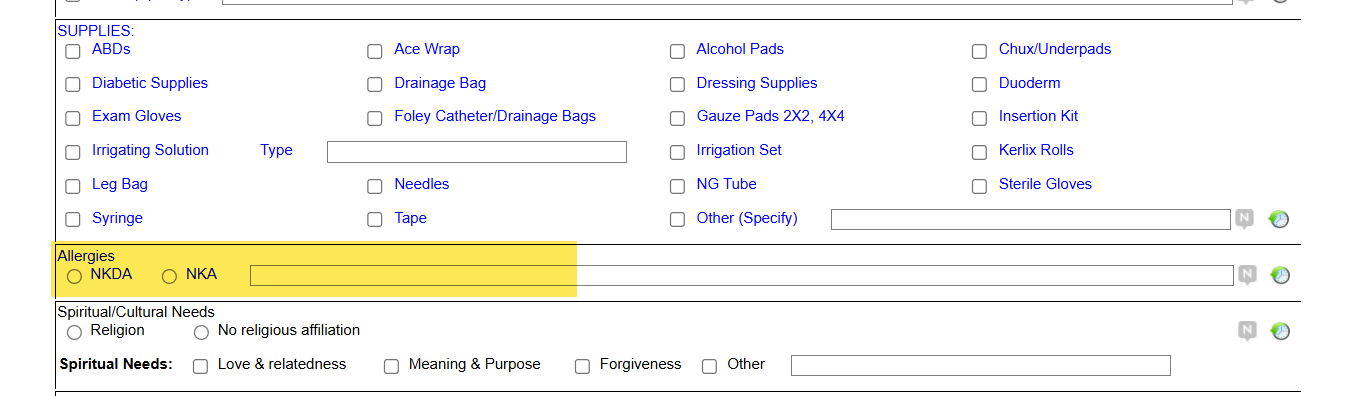
- Scroll down to the Care Plan Information section.
- Locate the Allergies question/field.
- Enter the allergy information here.
- When completed, this allergy data will:
- Automatically carry over to the POC/485
- Display in the Medication Profile
If Using a Standalone OASIS:
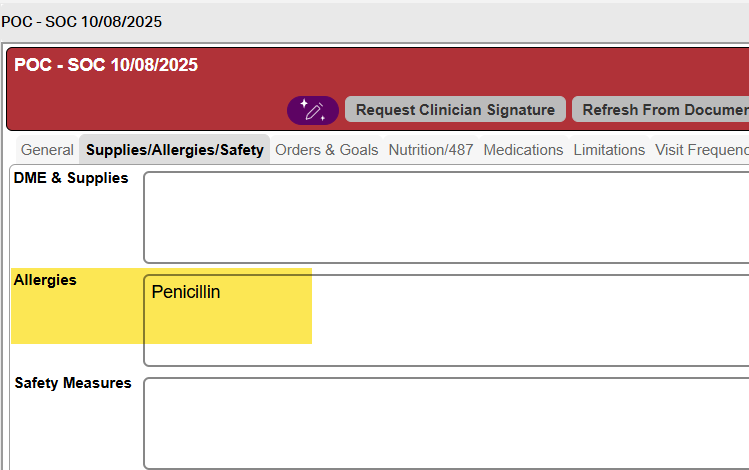
- Open and edit the POC/485.
- Navigate to the Supplies/Allergy/Safety tab.
- Enter the allergy details in the Allergies section.
- Save the changes.

Reminder: Always ensure allergy information is accurate and up to date, as it impacts patient safety and medication management.
This FAQ was generated based on Synergy AI/EMR App Version 7.0.38.36159 and Dashboards Version: 7.0.38.14741
Important: The information in this FAQ is based on the software version available at the time of publication and is subject to change. Please use the software responsibly. HealthCare Synergy is not liable for any issues resulting from outdated or incorrect use of this information.
Was this article helpful?
That’s Great!
Thank you for your feedback
Sorry! We couldn't be helpful
Thank you for your feedback
Feedback sent
We appreciate your effort and will try to fix the article