I accidentally deleted a document. Can I retrieve or undo it?
Yes, deleted documents are not permanently removed—they are moved to a Trash Bin within the patient chart and can be restored.
To undelete a document:
- Open the patient chart where the document was deleted
- In the Chart Navigation panel on the left, select Trash Bin
- Locate the deleted document
- Right-click on the document and select Undelete
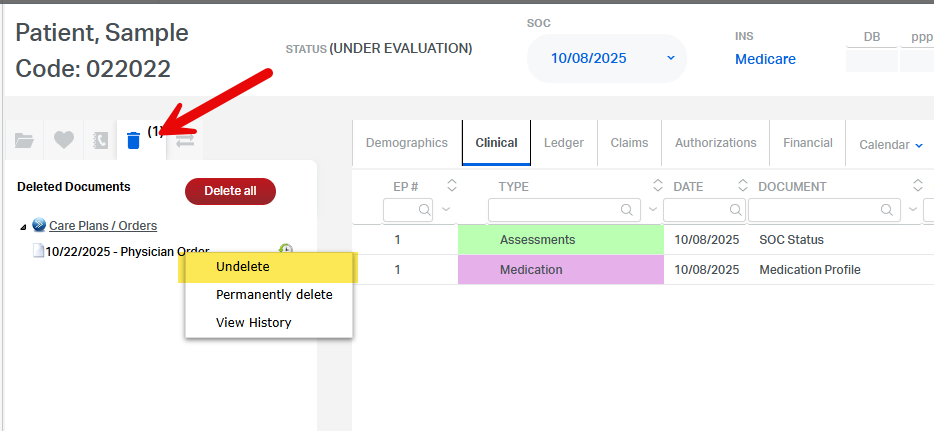
The document will be restored to its original location in the chart.
✅ Note: The ability to undelete may depend on your user permissions.
This FAQ was generated based on Synergy AI/EMR App Version 7.0.38.36159 and Dashboards Version: 7.0.38.14741
Important: The information in this FAQ is based on the software version available at the time of publication and is subject to change. Please use the software responsibly. HealthCare Synergy is not liable for any issues resulting from outdated or incorrect use of this information.
Was this article helpful?
That’s Great!
Thank you for your feedback
Sorry! We couldn't be helpful
Thank you for your feedback
Feedback sent
We appreciate your effort and will try to fix the article