Condition Code 47 is required when a patient was transferred from another Home Health Agency (HHA) at the time of admission. In the intake, putting a check on the Admitted from another HHA box will automatically include Condition Code 47 when claims are created. In case this step is missed, claims can be modified later to manually add Condition Code 47.
Steps to Manually Add Condition Code 47:
- Go to the patient's chart, then click on the Claims tab.
- Locate the claim needing the update and double-click to open it.
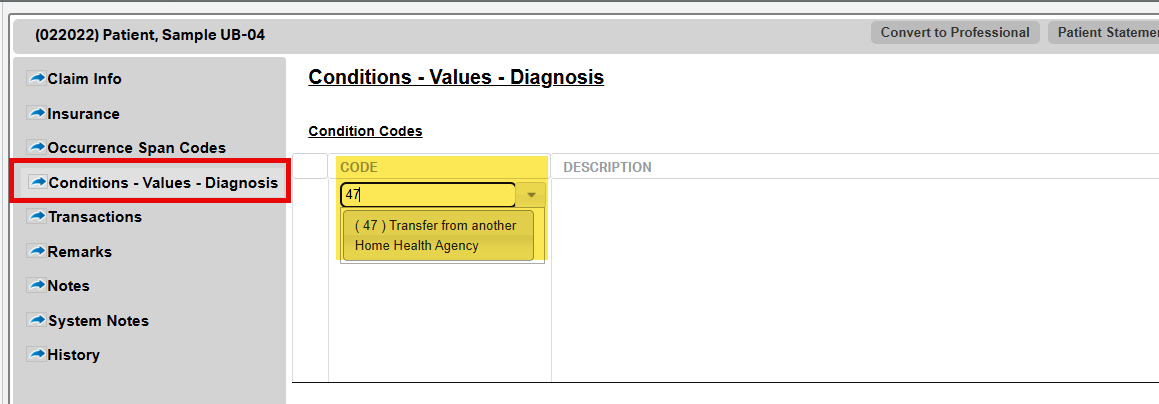
- Scroll to the Conditions–Values–Diagnosis section.
- In the Condition Code column, enter “47”.
- Click Save & Close.
Tip: Ensure this is applied only when applicable, as incorrect use of condition codes may lead to billing rejections or compliance issues.
This FAQ was generated based on Synergy AI/EMR App Version 7.0.38.36159 and Dashboards Version: 7.0.38.14741
Important: The information in this FAQ is based on the software version available at the time of publication and is subject to change. Please use the software responsibly. HealthCare Synergy is not liable for any issues resulting from outdated or incorrect use of this information.
Was this article helpful?
That’s Great!
Thank you for your feedback
Sorry! We couldn't be helpful
Thank you for your feedback
Feedback sent
We appreciate your effort and will try to fix the article