The UTN (Unique Tracking Number) is required for claims submitted under Review Choice Demonstration (RCD) or other pre-claim review processes. Identifying claims without a UTN helps ensure compliance and avoid payment delays.
Answer:
Yes, you can easily find all claims that are missing a UTN.
Steps:
- Go to the Reports > Open Dashboards.
- Click on Claims missing UTN
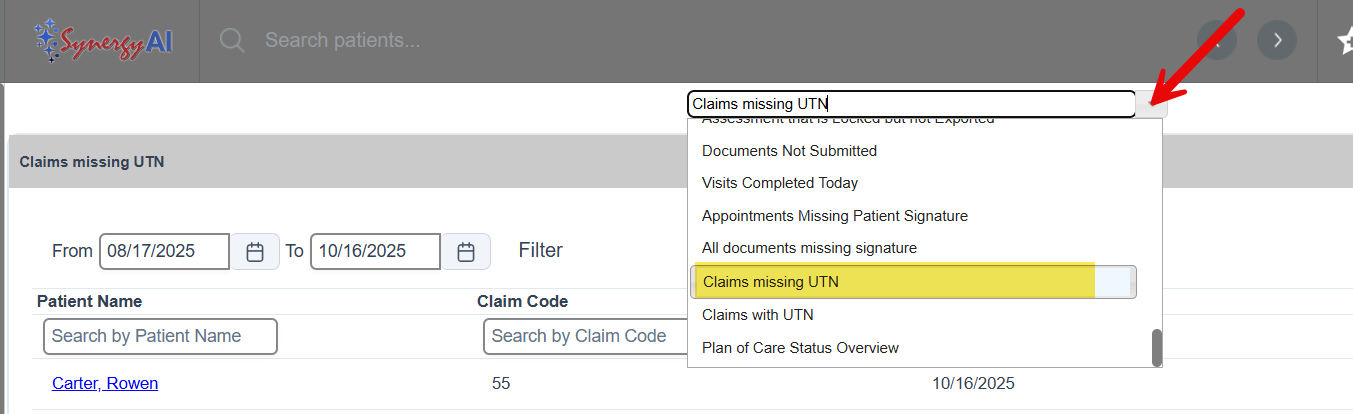
This will display a list of claims that are missing the required UTN, allowing you to take corrective action before submission.
This FAQ was generated based on Synergy AI/EMR App Version 7.0.38.36159 and Dashboards Version: 7.0.38.14741
Important: The information in this FAQ is based on the software version available at the time of publication and is subject to change. Please use the software responsibly. HealthCare Synergy is not liable for any issues resulting from outdated or incorrect use of this information.
Was this article helpful?
That’s Great!
Thank you for your feedback
Sorry! We couldn't be helpful
Thank you for your feedback
Feedback sent
We appreciate your effort and will try to fix the article