If you need to reverse payroll that has already been processed, the Recall Processed Payroll feature allows you to undo those transactions and return the payroll charges to an unpaid status.
Steps to recall processed payroll:
- Go to the Clinician menu and select Payroll Processing.
- Choose Recall Processed Payroll.
- Select how you want to recall payroll:
- By Date Processed, or
- By Visit Date
- By Date Processed, or
- Adjust any filters as needed.
- Click Refresh Table to view all processed payroll charges.
- Select the transactions you want to undo, then click Reset.
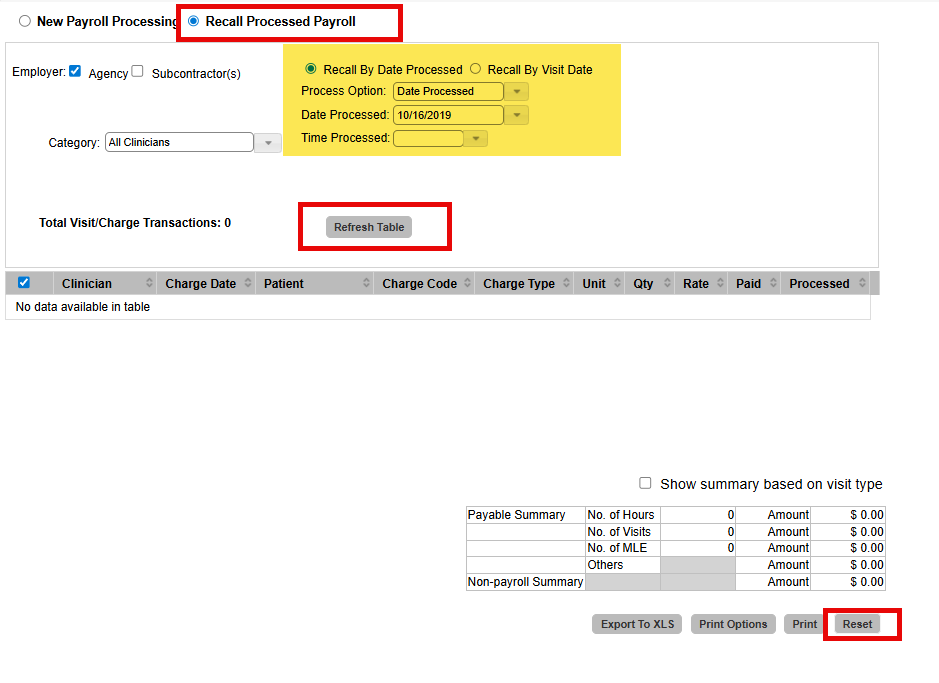
Note: Print options are available if you need documentation before resetting payroll.
This FAQ was generated based on Synergy AI/EMR App Version 7.0.38.36159 and Dashboards Version: 7.0.38.14741
Important: The information in this FAQ is based on the software version available at the time of publication and is subject to change. Please use the software responsibly. HealthCare Synergy is not liable for any issues resulting from outdated or incorrect use of this information.
Was this article helpful?
That’s Great!
Thank you for your feedback
Sorry! We couldn't be helpful
Thank you for your feedback
Feedback sent
We appreciate your effort and will try to fix the article