New agencies using Synergy EMR need to enter their official agency identifiers such as the NPI (National Provider Identifier), Employer ID, and Provider Number.
To enter these:
- Navigate to Settings > Agency Set Up Information
- Double-click on your agency name to open the edit window
- Go to the Provider Numbers tab
- Enter your NPI, Employer ID, and Provider Number in the appropriate fields
- Click Save to apply the changes
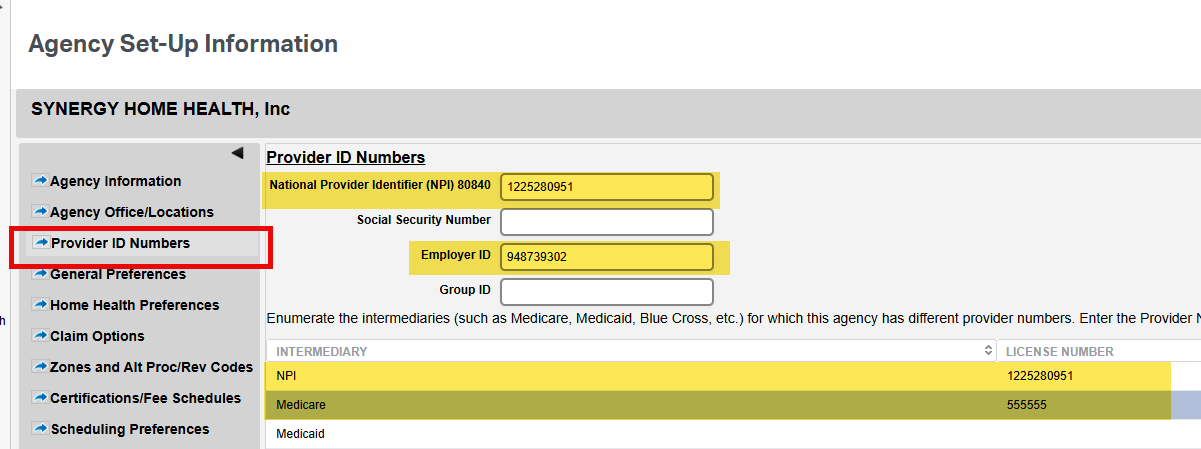
These identifiers are essential for billing, compliance, and integration with external systems. Make sure the information entered is accurate and up to date.
This FAQ was generated based on Synergy AI/EMR App Version 7.0.38.36159 and Dashboards Version: 7.0.38.14741
Important: The information in this FAQ is based on the software version available at the time of publication and is subject to change. Please use the software responsibly. HealthCare Synergy is not liable for any issues resulting from outdated or incorrect use of this information.
Was this article helpful?
That’s Great!
Thank you for your feedback
Sorry! We couldn't be helpful
Thank you for your feedback
Feedback sent
We appreciate your effort and will try to fix the article