Home Health Agencies (HHAs) are required to submit CAHPS Home Health Surveys to gather standardized feedback from patients about their experience with the agency.
Synergy EMR helps agencies by generating a report containing patient information eligible for CAHPS submission. Actual surveys must be administered and submitted by an approved third-party CAHPS vendor.
Before You Begin:
If this is your first time submitting CAHPS data, make sure you've selected and registered with a CMS-approved CAHPS vendor. Some vendors support automatic submission directly from Synergy, while others require manual file upload.
To Generate a CAHPS Export Report:
- Navigate to Imp/Exp > CAHPS.
- Choose the appropriate Export Type.
- Select the Export Format
- Choose the Month for which you are submitting data.
- Click Export.
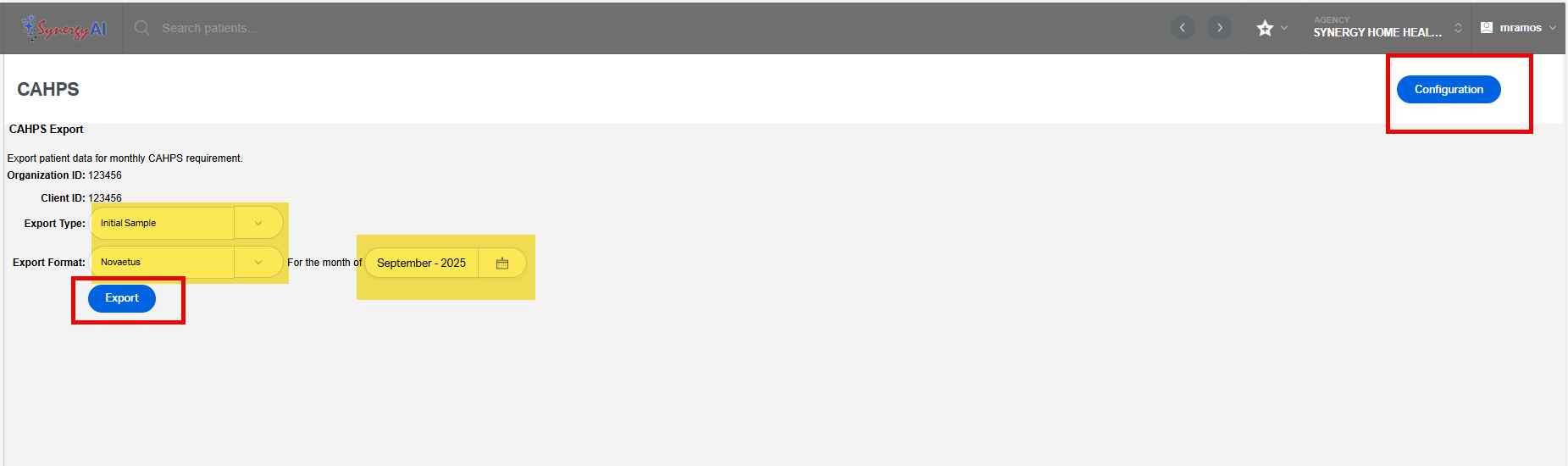
Depending on the format selected:
- Some formats allow automatic submission directly from Synergy to the vendor.
- Others will generate a file that must be manually uploaded to your CAHPS vendor's portal.
Configuration (Optional):
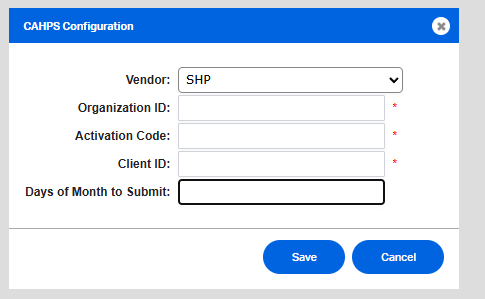
Some CAHPS vendors require specific information to be included in the report. Click the Configuration button to enter or update fields such as:
- Organization ID
- Client ID
- Activation Code
- Auto Submission Settings (e.g., day of the month to submit)
This FAQ was generated based on Synergy AI/EMR App Version 7.0.38.36159 and Dashboards Version: 7.0.38.14741
Important: The information in this FAQ is based on the software version available at the time of publication and is subject to change. Please use the software responsibly. HealthCare Synergy is not liable for any issues resulting from outdated or incorrect use of this information.
Was this article helpful?
That’s Great!
Thank you for your feedback
Sorry! We couldn't be helpful
Thank you for your feedback
Feedback sent
We appreciate your effort and will try to fix the article