Step 1 — Navigate to Open Dashboards
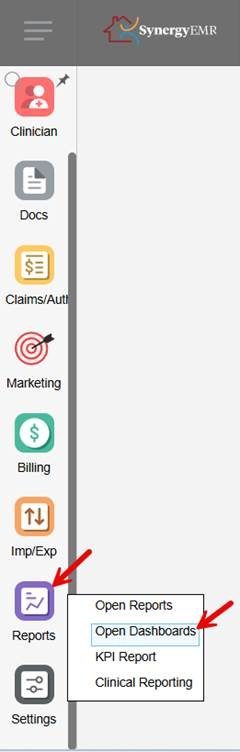
On the left-side menu, click on Reports. From the dropdown, select Open Dashboards.
Step 2 — Select the Report
From the dashboard dropdown at the top, select "Visits with a duration less than 15 minutes."

Step 3 — Set the Date Range and Filter
Enter the desired date range in the Appointments From and To fields, then click Filter to generate the results.
This FAQ was generated based on Synergy AI/EMR App Version 7.0.41.38129 and Dashboards Version: 7.0.41.15871
Important: The information in this FAQ is based on the software version available at the time of publication and is subject to change. Please use the software responsibly. HealthCare Synergy is not liable for any issues resulting from outdated or incorrect use of this information.
Was this article helpful?
That’s Great!
Thank you for your feedback
Sorry! We couldn't be helpful
Thank you for your feedback
Feedback sent
We appreciate your effort and will try to fix the article