Error Message: [E3] Claim with coverage start of 'mm/dd/yyyy' has the following Diagnosis Codes that are not ready to be billed: ‘diagnosis code'
What it Means: This error occurs when a claim includes ICD-10-CM diagnosis codes that are not valid for the date of service. You must Verify the diagnosis code on the claim against the latest ICD-10-CM code set entered in the Plan of Care.
- October 1 is the start of the new ICD-10-CM fiscal year, and codes can change (updated, deleted, added).
- If Synergy EMR detects a claim with a new code before it becomes valid, or an old code after it's retired, the system will trigger an EMC error E3.
The Fix: Create "Other Follow-Up" in the patient chart.
Steps:
- Go to patient chart.
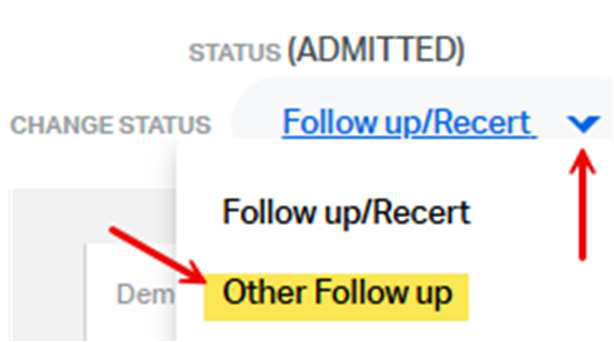
- On the ‘Change Status', click on the down arrow and select "Other Follow-Up"
- OASIS Documentation: Select ‘No' to OASIS document included option.
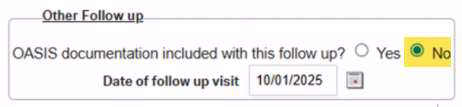
- Date of Follow-Up Visit – How to Choose the Correct Date:
- If Claim Period Start = 10/01/2025 then enter 10/01/2025
- If Claim Period Start is after 10/01/2025 then enter one day before the claim period start date
- Example: Claim Period Start:10/05/2025 and Other Follow-Up Date: 10/04/2025
This FAQ was generated based on Synergy AI/EMR App Version 7.0.38.36159 and Dashboards Version: 7.0.38.14741
Important: The information in this FAQ is based on the software version available at the time of publication and is subject to change. Please use the software responsibly. HealthCare Synergy is not liable for any issues resulting from outdated or incorrect use of this information.
Was this article helpful?
That’s Great!
Thank you for your feedback
Sorry! We couldn't be helpful
Thank you for your feedback
Feedback sent
We appreciate your effort and will try to fix the article