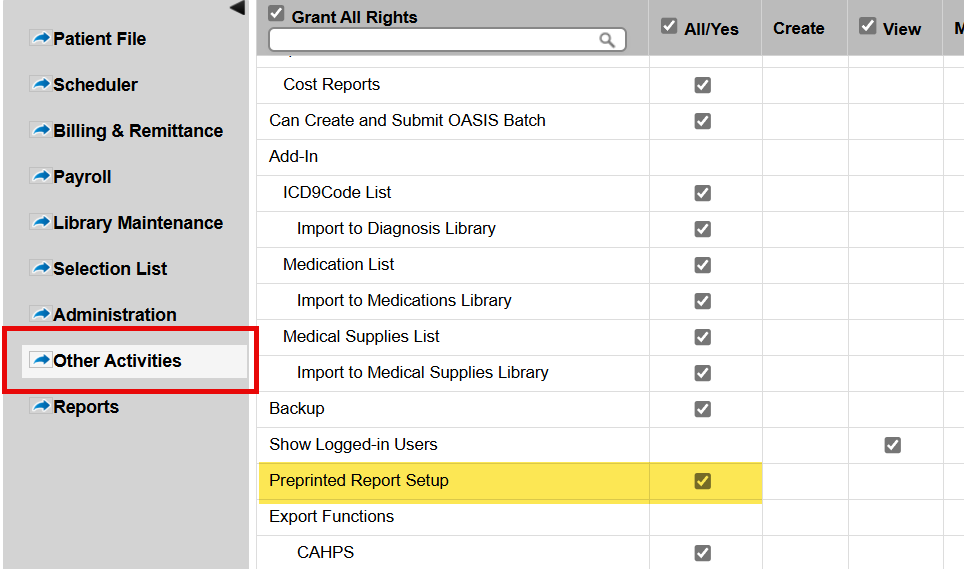
This error message appears when a user attempts to print claims in Synergy EMR. It is caused by a missing permission in the user's account settings. A specific permission called “Preprinted Report Setup” must be enabled.
Steps to Resolve
- Navigate to: Settings > User Log Ins
- Find the user account (a back office user) that is encountering the issue.
- Click to edit that user's permissions.
- Go to the Other Activities tab.
- Enable the permission by checking the box for: Preprinted Report Setup
- Click Save. Have the user log off and log back in to apply the changes.
Important:
- Only users with administrative access to User Log Ins can modify permissions.
- This setting is required for users who need to print or preview claims.
- If the issue persists after changes, confirm the correct user profile was updated and the user has restarted their session.
This FAQ was generated based on Synergy AI/EMR App Version 7.0.38.36159 and Dashboards Version: 7.0.38.14741
Important: The information in this FAQ is based on the software version available at the time of publication and is subject to change. Please use the software responsibly. HealthCare Synergy is not liable for any issues resulting from outdated or incorrect use of this information.
Was this article helpful?
That’s Great!
Thank you for your feedback
Sorry! We couldn't be helpful
Thank you for your feedback
Feedback sent
We appreciate your effort and will try to fix the article