To delete a claim, follow these steps:
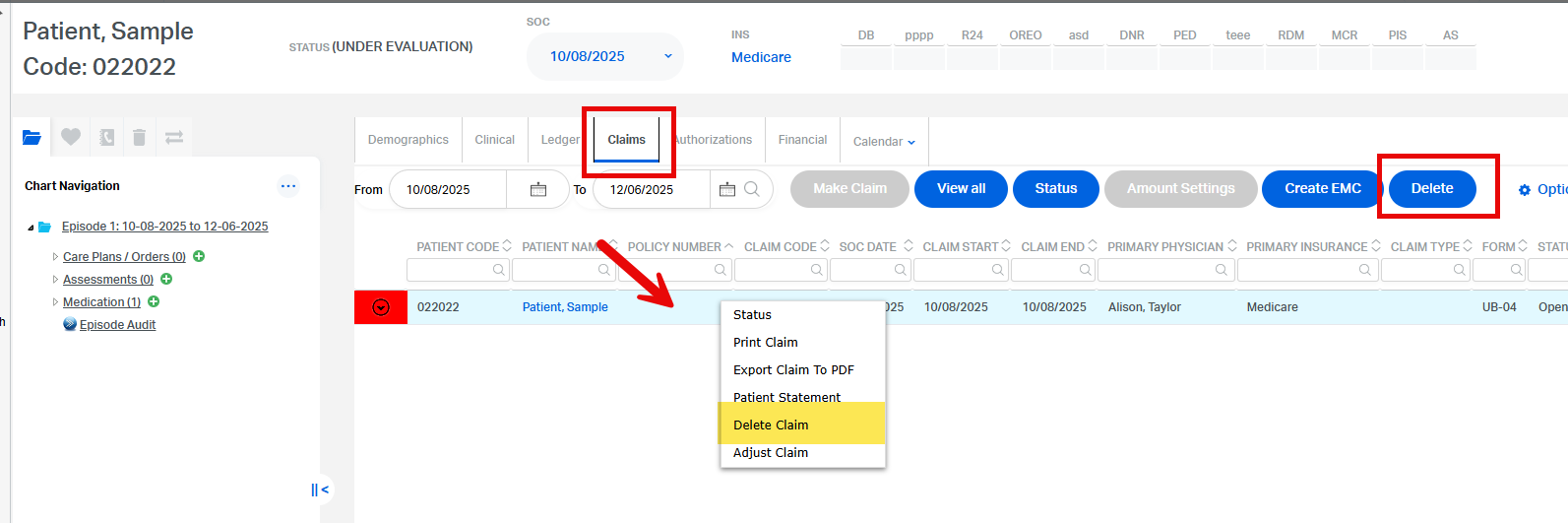
- Go to the Patient Chart > Claims Tab
- Locate the claim you want to delete
- Either:
- Right-click on the claim and select Delete Claim, or
- Click the claim to highlight it, then click the Delete button at the top right
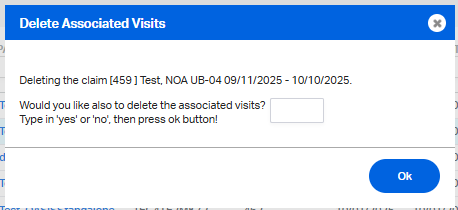
4. Please type Yes or No accordingly to the next prompt:
YES - if ALSO deleting all posted visits
NO- if you wish to keep the posted visits
Note:
- Claims can only be deleted one at a time
- Deleting claim erases the history and original sent date of the claim
- Deleting claim also deletes any notes/remarks entered inside the claim.
- It can potentially, delete all posted visits if you type YES to that one question.
- Previously posted payments and adjustments will also have to be entered/included again.
This FAQ was generated based on Synergy AI/EMR App Version 7.0.38.36159 and Dashboards Version: 7.0.38.14741
Important: The information in this FAQ is based on the software version available at the time of publication and is subject to change. Please use the software responsibly. HealthCare Synergy is not liable for any issues resulting from outdated or incorrect use of this information.
Was this article helpful?
That’s Great!
Thank you for your feedback
Sorry! We couldn't be helpful
Thank you for your feedback
Feedback sent
We appreciate your effort and will try to fix the article