CMS requires that OASIS assessments be submitted in a specific format — a zipped (.zip) OASIS submission file.
Steps:
- Lock the OASIS assessment by approving it.
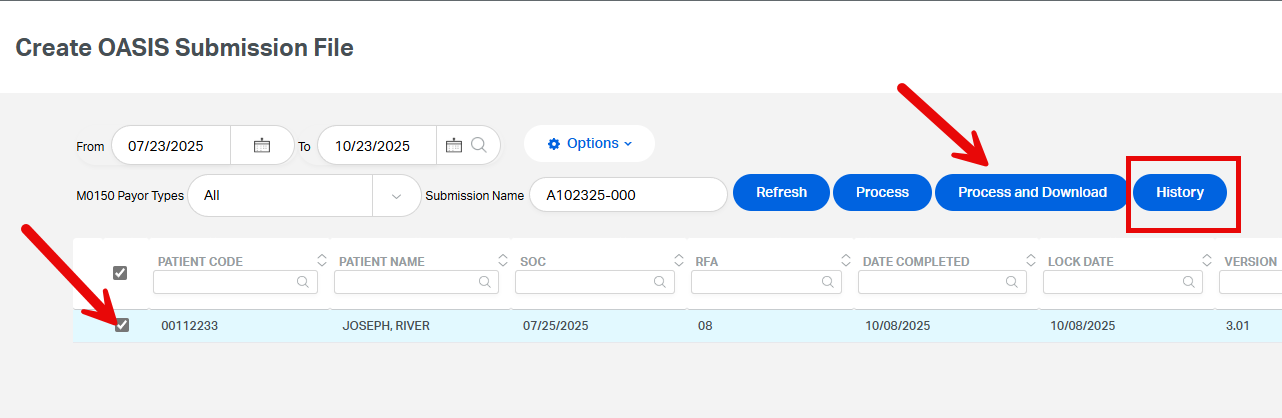
- Go to Imp/Exp > Create OASIS Submission File.
- Select the OASIS assessments you want to include in the submission.
- Click Process and Download.
- The OASIS ZIP file will be saved to the Downloads folder on the client's computer.
Tip:
Users can click the History button to redownload a previously generated OASIS ZIP file or to view and print the submission summary.
This FAQ was generated based on Synergy AI/EMR App Version 7.0.38.36159 and Dashboards Version: 7.0.38.14741
Important: The information in this FAQ is based on the software version available at the time of publication and is subject to change. Please use the software responsibly. HealthCare Synergy is not liable for any issues resulting from outdated or incorrect use of this information.
Was this article helpful?
That’s Great!
Thank you for your feedback
Sorry! We couldn't be helpful
Thank you for your feedback
Feedback sent
We appreciate your effort and will try to fix the article